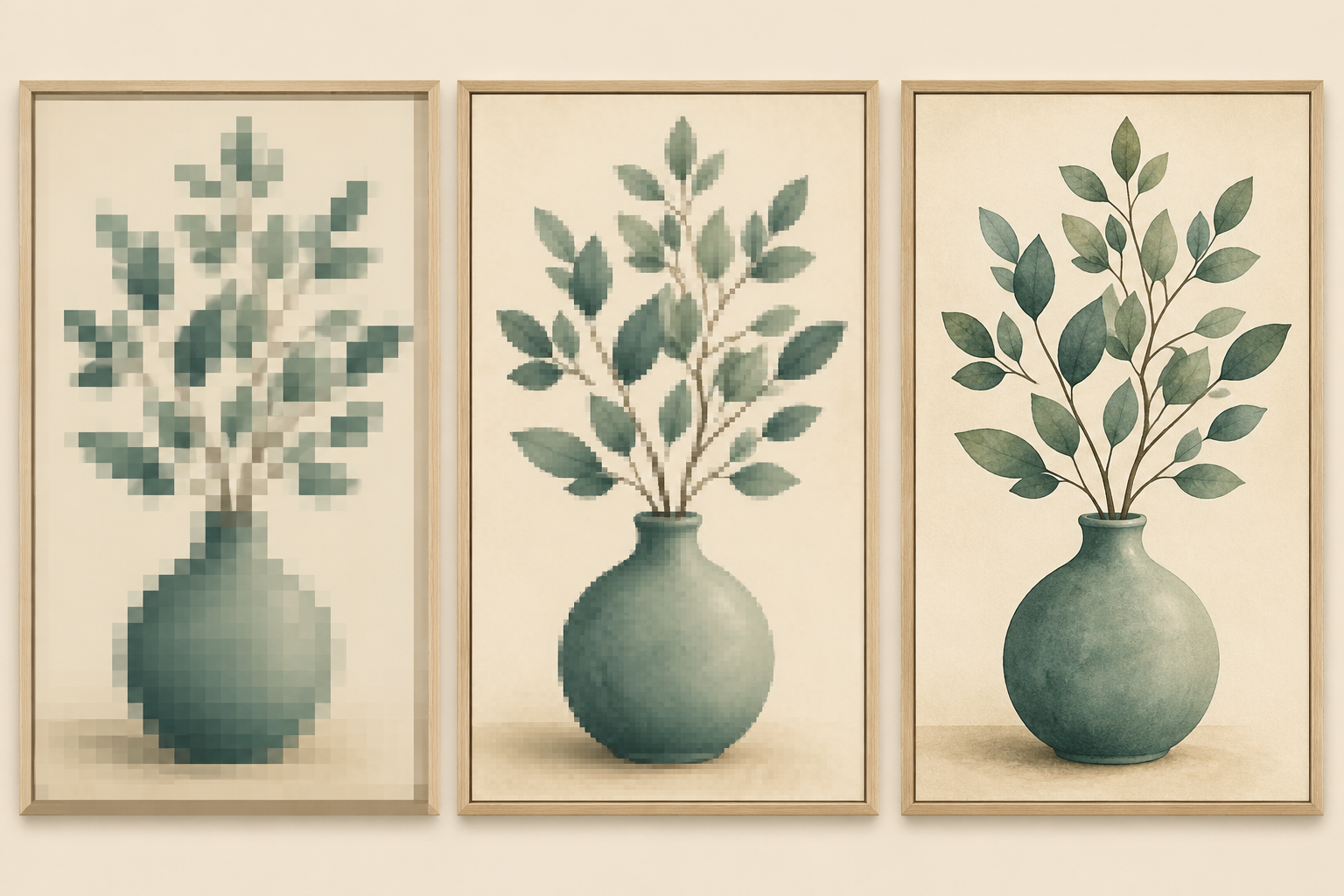
“300 DPI” is the most repeated number in Etsy wall art listings, and the most misunderstood. Sellers list “300 DPI” without knowing what it does. Buyers see “300 DPI” and assume their print will look great. Sometimes both are wrong.
This is what 300 DPI actually means, when it matters, when it doesn’t, and how to check that the files you’re shipping match what your listing claims.
What DPI actually measures
DPI (dots per inch) is a print density value. It tells the printer how many dots of ink to lay down per inch of paper. Higher DPI = more dots = sharper print at small viewing distances.
DPI is meaningless without an attached physical size. A 4800 × 6000 pixel image has no DPI until you decide how big to print it:
- Print it at 16 × 20 inches → 300 DPI
- Print it at 32 × 40 inches → 150 DPI
- Print it at 8 × 10 inches → 600 DPI
The same file, three different resolutions. That’s the trick of DPI: it’s a function of pixel count and print size, not a property of the file itself.
When 300 DPI is the right target
300 DPI is the print industry’s standard for professional, close-viewing print quality. Aim for it when:
- The piece will be viewed at arm’s length: desk art, tabletop frames, eye-level wall hangings
- The art has sharp edges or text: typographic prints, line art, technical illustrations
- The buyer is using a good home inkjet (Canon Pixma, Epson EcoTank, similar) that can actually resolve 300 DPI
- The print size is small to medium: 8×10 through 18×24 inches
For Etsy wall art, 300 DPI is the safe default because Etsy buyers print across all these scenarios. Listing files at 300 DPI for the largest size you support means they’ll look sharp at every smaller size too.
When 150 DPI is enough
150 DPI looks identical to 300 DPI when:
- The print is viewed from across the room: a 24×36 above a couch, a 36×48 on a hallway wall
- The art is photographic with smooth gradients and no fine detail
- The print is going on canvas or matte paper that doesn’t resolve fine detail anyway
Some print-on-demand services explicitly recommend 150 DPI for large-format prints because the human eye can’t resolve more at typical viewing distances. Going to 300 DPI on a 36×48 just doubles the file size for no visible benefit.
But on Etsy specifically, listing “150 DPI” makes buyers nervous, even when it’s technically correct. Stick with 300 DPI as your listed spec.
When higher than 300 doesn’t help
Some sellers list “600 DPI” thinking it’s better. It usually isn’t.
- Most home inkjets max out at ~720 DPI nozzle resolution. Beyond 300 DPI in the file, the extra detail is wasted.
- File sizes balloon with no visible benefit (a 600 DPI 16×20 is 4× the bytes of 300 DPI).
- Etsy’s 20 MB upload cap kicks in fast at 600 DPI for larger sizes.
Stick with 300 DPI for everything except specialty print-shop listings (which are a separate market).
The 300 DPI math you actually need
For each common Etsy print size, the pixel count required at 300 DPI is:
| Print size | Pixels at 300 DPI |
|---|---|
| 8 × 10 in | 2400 × 3000 |
| 11 × 14 in | 3300 × 4200 |
| 12 × 18 in | 3600 × 5400 |
| 16 × 20 in | 4800 × 6000 |
| 18 × 24 in | 5400 × 7200 |
| 20 × 30 in | 6000 × 9000 |
| 24 × 36 in | 7200 × 10800 |
| A4 (210×297mm) | 2480 × 3508 |
| A3 (297×420mm) | 3508 × 4961 |
| A2 (420×594mm) | 4961 × 7016 |
| A1 (594×841mm) | 7016 × 9933 |
Generate at the largest size your listing supports. Buyers can downscale; they can’t upscale.
How to check the DPI of a file you’re about to ship
The fast way:
- Mac: Right-click → Get Info → “More Info” expands to show resolution
- Windows: Right-click → Properties → Details tab → Image properties section
- Photoshop / Affinity: Image → Image Size, look at the Resolution field
- Online: Drop the file at metadata2go.com or similar. It shows DPI in the EXIF data.
What you’re checking: the file’s DPI metadata flag. This doesn’t tell the printer anything about pixel-level quality, but it does signal to print software what physical size to default to.
Why “AI upscaling” matters for wall art
If you generate art at 1024 × 1024 (the typical AI image gen output) and try to print at 16 × 20, you get 51 DPI. That prints blurry on any home printer.
To hit 300 DPI at 16 × 20 (4800 × 6000 pixels), you need to upscale the AI output ~5× larger. AI upscalers (Topaz and similar) reconstruct detail intelligently rather than just stretching pixels. Properly upscaled AI art at 300 DPI is indistinguishable from natively-rendered high-res work at typical viewing distances.
The shop that ships 1024px raster files and lists “300 DPI” is technically lying. Buyers find out when they print and leave reviews about it. The shop that upscales to true 7200×10800 at 300 DPI is shipping what the listing claims.
How Elistit handles upscaling and DPI
Every wall art file produced through Elistit is upscaled single-shot to true print resolution at 300 DPI for the largest supported ratio, the same print-grade upscale at both quality levels.
The DPI metadata flag is set correctly on every output file. What the listing claims matches what ships.
See how wall art upscale works →
FAQ
Is 300 DPI overkill for digital wall art? For files printed at 24×36 or larger and hung above a couch, technically yes. But it’s the spec Etsy buyers expect, and the file size cost is manageable. Stay with 300 DPI as the listed spec.
What’s the difference between DPI and PPI? PPI (pixels per inch) describes screens; DPI describes prints. For Etsy listings, treat them as equivalent. Most printers and image software use them interchangeably.
Can I save a low-res file as 300 DPI? You can change the metadata tag, but the print won’t actually be 300 DPI. The pixel count determines real resolution; the DPI tag just changes the default print size.
Do all printers print at 300 DPI? No. Most home inkjets effectively print at ~150–300 DPI of true detail. Professional print shops can go higher. The 300 DPI standard is calibrated to home inkjets at small to medium sizes.
What about retina screens? Do digital products need higher DPI? For digital wallpapers or screen art, ignore DPI entirely and think in pixels. A 4K wallpaper is 3840 × 2160 pixels. DPI doesn’t apply.
Quick questions
Quickly answered.
Q.01Is 300 DPI overkill for digital wall art sold on Etsy?
For very large prints (24×36 inches or bigger) 150–200 DPI is technically sufficient because viewing distance increases with print size. But 300 DPI is what Etsy buyers expect and list in reviews. Ship 300 DPI as the stated spec and let buyers print at whatever size they choose.
Q.02What is the difference between DPI and PPI for Etsy digital art?
PPI (pixels per inch) describes screen displays. DPI (dots per inch) describes physical prints. For Etsy listings, treat them as equivalent. Most printers and image editing applications use the terms interchangeably, and buyers do not distinguish between them.
Q.03Can I just tag a low-resolution file as 300 DPI on Etsy?
You can change the metadata tag, but the print quality will not be 300 DPI. The pixel dimensions determine real print resolution. A 1200×1500 pixel file tagged at 300 DPI only prints sharply at 4×5 inches regardless of what the tag says.
Q.04Do all home printers actually print at 300 DPI?
No. Most home inkjets produce effective detail resolution closer to 150–300 DPI depending on the ink and paper. Professional print shops can go higher. The 300 DPI standard is calibrated to the realistic capability of the home printers most Etsy buyers own.
Q.05Do digital art files for screen use need 300 DPI?
No. For screen art (phone wallpapers, digital planners, social media graphics), ignore DPI entirely and think in pixels. A standard 4K wallpaper is 3840×2160 pixels at any DPI value. The DPI metadata tag is meaningless for screen display.
Keep going.
Best Image Dimensions for Etsy Listing Photos in 2026
Etsy's actual listing photo specs: file size limits, recommended dimensions, aspect ratio behavior, and how mobile vs desktop crop your photos differently.
Etsy Mockup Standards: What Makes a Listing Photo Convert
The mockup conventions that separate a 1% click-through-rate from a 6% one: composition, scene choice, framing, and the psychology of buyer scrolling.
From Idea to Etsy Listing: A 12-Minute Workflow
The complete idea-to-listing flow that takes most sellers a weekend, broken into the 12 minutes Elistit actually needs.
SVG vs PNG for Etsy Digital Downloads: When to Use Each
PNG raster, SVG vector: which format Etsy buyers actually want, and how to package digital downloads so neither format causes returns.