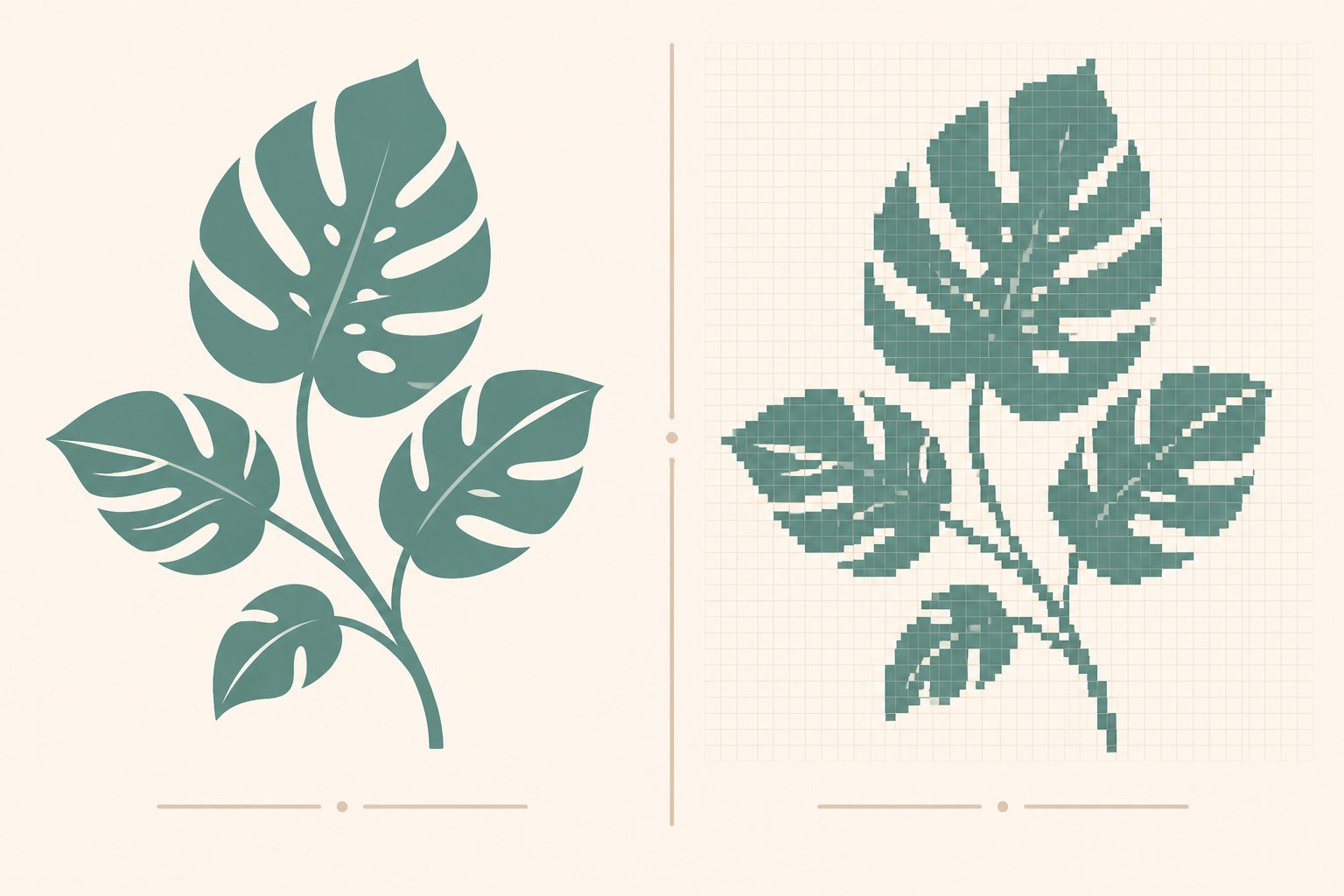
Etsy buyers searching for digital downloads fall into two camps: PNG buyers, who want a finished, printable image, and SVG buyers, who want an editable vector file they can scale, recolor, or send to a Cricut. Selling the wrong format to the wrong buyer is the single most common reason for returns and 1-star reviews on digital products.
This is when each format wins, when each loses, and how to package listings so the buyer always gets what they actually need.
The fundamental difference
A PNG is a grid of pixels. Zoom in far enough and the grid shows. Resize it bigger than the original and it gets blurry. Recoloring or editing it requires Photoshop-level work.
An SVG is a description of shapes: points, curves, fills, strokes. It scales infinitely without losing crispness. It’s editable in any vector tool (Illustrator, Inkscape, Affinity Designer). It also works in Cricut Design Space, Silhouette Studio, and most heat-press/cutting software.
For most Etsy buyers, that distinction maps to a use case:
- Wall art, posters, framed prints, photographs → PNG (or JPEG)
- Cricut projects, vinyl decals, t-shirt designs, mugs, stencils → SVG
When PNG is the right choice
PNG (or JPEG, for photographic content) is correct when:
- The buyer is printing once at one size they already know
- The art has photographic or painterly detail that wouldn’t survive a vector conversion
- The piece has gradient, watercolor, or texture (vector handles this poorly)
- The end use is on-screen (phone wallpaper, printable planner pages, social posts)
PNG specifically (over JPEG) is correct when:
- Transparency is needed (clipart, logos overlaid on other backgrounds)
- The art has sharp edges or text that JPEG compression would soften
The lazy default for wall art is JPEG quality 95+ at 300 DPI in sRGB. Use PNG when you need transparency or when the art has text or sharp lines.
When SVG is the right choice
SVG is correct when:
- The buyer plans to cut, etch, or weed the design (Cricut, Silhouette, laser cutters)
- The buyer wants to recolor or edit the design themselves
- The design needs to scale to multiple sizes (one design used on a tumbler, t-shirt, and decal)
- The art is flat, geometric, or typographic (designs that survive vectorization)
SVG is wrong when:
- The art has photographic detail
- The art has soft gradients or watercolor-style shading
- The buyer wants a single printed image (they need a high-res raster, not editability)
Etsy SVG buyer expectations
Buyers searching “SVG” on Etsy in 2026 expect a specific bundle:
- SVG file: the master vector
- PNG file at high resolution (3000+ pixels) with transparent background, for buyers whose software doesn’t import SVG cleanly
- DXF file: older Cricut machines and some Silhouette setups still need DXF
- EPS file: for buyers using Illustrator or Affinity Designer
A “SVG only” listing converts much worse than a “SVG + PNG + DXF + EPS” bundle even though the price is identical. The bundle satisfies the buyer’s downstream tool chain, whatever it is.
What about JPEG?
JPEG is the smallest file format and the default for anything photographic. Wall art with painterly textures, photography listings, and posters with illustration work fine as JPEG at quality 95+.
The reasons to choose PNG over JPEG for raster work:
- Transparent background needed (PNG)
- Sharp edges and typography (PNG handles edges cleaner)
- File will be re-edited by the buyer (PNG, but really they want SVG)
The reason to stick with JPEG: file size. A 7200 × 10800 JPEG is ~3 MB. The same image as PNG is ~30 MB. Etsy has a 20 MB per-file upload cap. JPEG keeps you safely under it.
File format pitfalls
1. Color space mismatches. Adobe RGB and ProPhoto look great on screen but print muted. Convert to sRGB before exporting. This is the #1 reason for “the print looks different” complaints.
2. SVG with embedded raster. Some “SVG” files are actually a PNG wrapped in an SVG container. They don’t scale. They don’t cut. They don’t recolor. Real SVG buyers are angry about this. Always make sure your SVG is genuinely vector. Open it in a text editor; if you see <image> tags with base64 PNG data, it’s not vector.
3. CMYK PNG files. PNGs are technically RGB-only. Files saved with CMYK profiles cause color shifts in some software. Stick to sRGB for PNG.
4. Transparent backgrounds in JPEG. JPEG doesn’t support transparency. Files saved as JPEG with “transparent” backgrounds end up white. Use PNG when transparency matters.
5. SVG files with Illustrator-specific features. Some SVG features (clip masks, filters, text-on-path) don’t render correctly in Cricut Design Space. Test your SVG in the buyer’s actual tool before listing.
Packaging for both buyer types
If your design works equally well as raster and vector (common for stickers, simple illustrations, typographic art), list both formats in one listing. Two file types in one ZIP for the same price almost always converts better than two separate listings.
A typical “both formats” Etsy listing includes:
- 1 SVG (the master)
- 1 PNG with transparent background, 4096+ pixels on the long edge, 300 DPI
- 1 JPEG with white background, same resolution
- Optionally: DXF, EPS, PDF for fuller buyer coverage
How Elistit handles each format
Elistit produces native SVG output through the SVG product type: true vectors, not raster files in vector containers. Each SVG ships with a high-resolution PNG variant at transparent background and the listing copy buyers expect.
PNG-based product types (wall art, posters) ship as JPEG at 300 DPI in sRGB across all five standard ratios. Clipart ships as transparent PNG at 4096 pixels, with clean transparent edges.
The right format for the right product type, without the format decision being your problem.
See SVG generation → | See clipart bundles →
FAQ
Should I always include both PNG and SVG? Only if your design genuinely works in both formats. Forcing a watercolor wall art into SVG produces ugly results. Forcing a Cricut decal into PNG only loses the buyer who needs to scale it.
Can buyers convert PNG to SVG? There are tools (Vector Magic, online tracers) but the results are usually rough. Don’t market a PNG as “easy to vectorize.” Buyers who need vector files want vectors.
What’s the highest-converting digital download format? Bundles. A listing with 4–6 file formats included in one ZIP outperforms a single-format listing on identical content, because it maximizes downstream tool compatibility.
Is AI vector generation as good as hand-drawn vector? For flat, geometric, or typographic art: yes, comparably. For complex illustration with line variation, hand-drawn vector still wins for now. AI vector generation has improved substantially in 2025–2026.
Do I need to convert RGB to CMYK for print-on-demand SVGs? Most print-on-demand workflows handle the conversion automatically. Only worry about CMYK if you’re sending files to a specific commercial printer that requested it.
Quick questions
Quickly answered.
Q.01Should I always include both SVG and PNG in an Etsy digital download listing?
Only if your design genuinely works as both a raster and a vector. Forcing a watercolor wall art into SVG produces poor-quality output. Forcing a Cricut decal into PNG only loses buyers who need to scale or recolor the file. Match the format to the design and the buyer.
Q.02Can Etsy buyers convert a PNG file to SVG themselves?
There are auto-trace tools like Vector Magic, but results are usually rough, especially on artwork with gradients, textures, or fine detail. Do not market a PNG as easy to vectorize. Buyers who need a true vector file want a proper SVG, not a traced approximation.
Q.03What digital download format converts best on Etsy?
Bundles with multiple formats in one ZIP. A listing that includes SVG, PNG transparent, and JPEG in a single download consistently outperforms single-format listings on identical artwork because it works with more buyer tools and use cases.
Q.04Is AI-generated SVG vector art as good as hand-drawn vector for Etsy?
For flat, geometric, typographic, or icon-style art: yes, comparably good. For complex illustration work with subtle line variation or organic detail, hand-drawn vector still produces better results. AI vector generation has improved substantially through 2025–2026.
Q.05Do Etsy sellers need to convert files from RGB to CMYK for print-on-demand?
Not usually. Most print-on-demand workflows convert color profiles automatically. Only convert to CMYK if a specific commercial printer explicitly requests it. Shipping CMYK files to a service expecting sRGB can actually cause color shifts in the opposite direction.
Keep going.
Best Image Dimensions for Etsy Listing Photos in 2026
Etsy's actual listing photo specs: file size limits, recommended dimensions, aspect ratio behavior, and how mobile vs desktop crop your photos differently.
Etsy Mockup Standards: What Makes a Listing Photo Convert
The mockup conventions that separate a 1% click-through-rate from a 6% one: composition, scene choice, framing, and the psychology of buyer scrolling.
From Idea to Etsy Listing: A 12-Minute Workflow
The complete idea-to-listing flow that takes most sellers a weekend, broken into the 12 minutes Elistit actually needs.
Sticker Print Specs for Etsy: Bleed, DPI, and Cut Lines Explained
What every Etsy sticker file needs: bleed area, safe zone, DPI, transparent backgrounds, and the cut-line geometry that survives die-cutting.